Smart checkout links for your time.
Home: your client's calendar.
Cal2Cash connects to Google Calendar and turns meetings into payment requests — with smart links, automated reminders, and real-time tracking. No invoicing software. No chasing clients. Just book, meet, get paid.
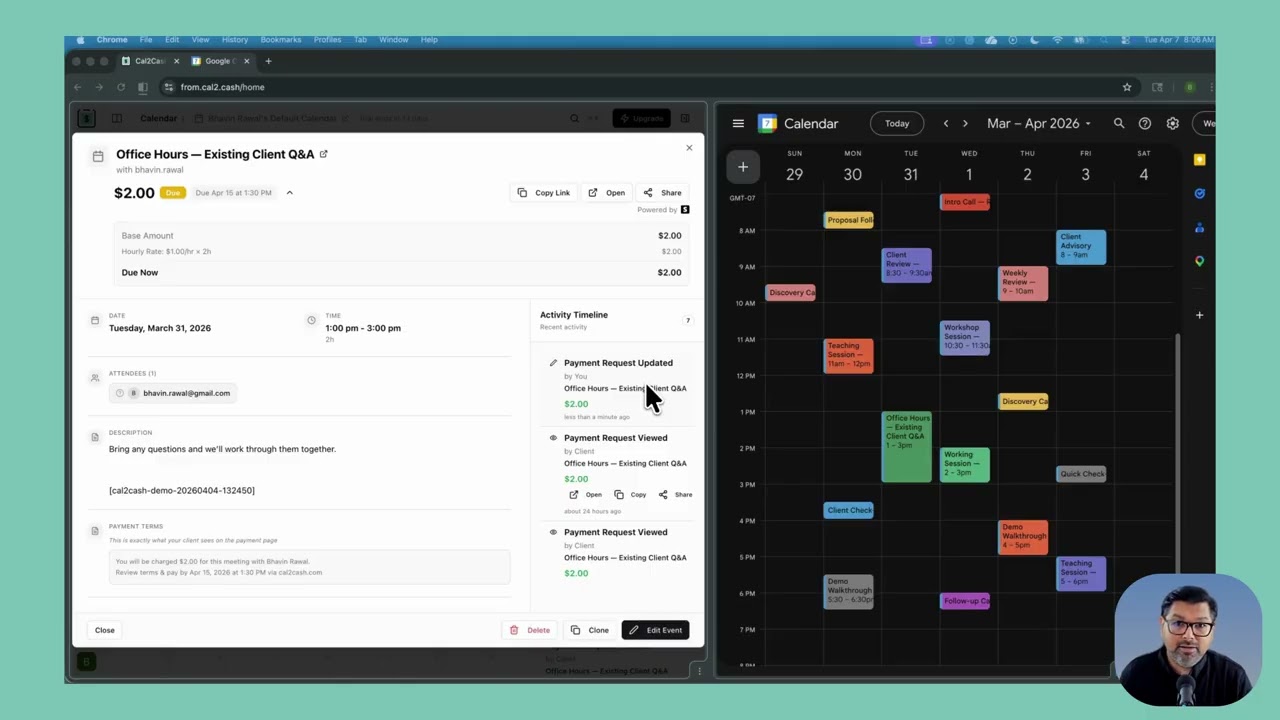
From calendar event to paid invoice
in seconds — not hours.
Four steps. Zero extra tools. Cal2Cash lives inside Google Calendar.
Connect your Google Calendar
Sign in once with Google. Cal2Cash reads your calendar events — no data is ever sold or shared.
Set your rate on any event
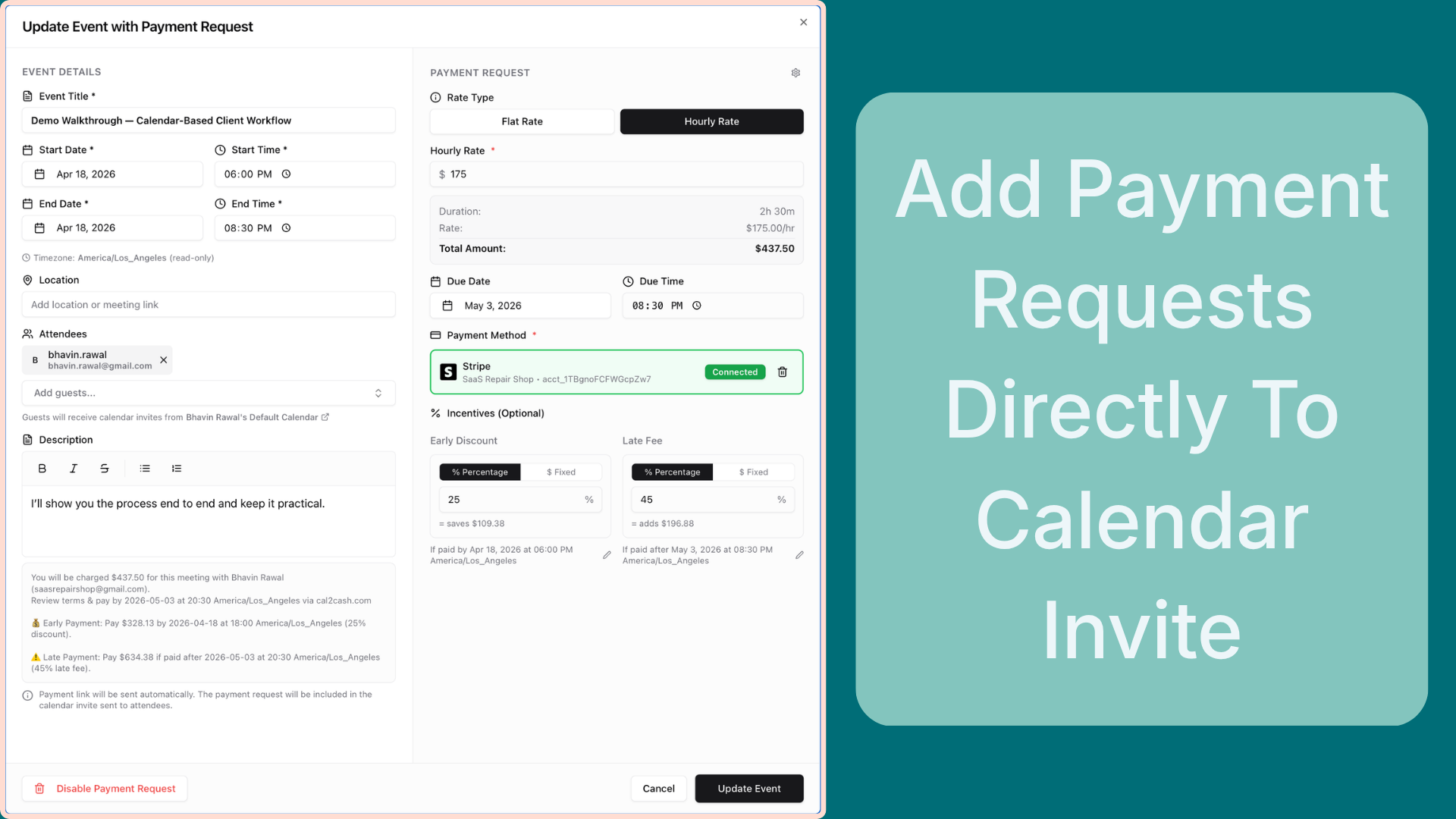
Add a flat fee or hourly rate to any calendar event. Amount auto-calculates from session duration.
Share the payment link
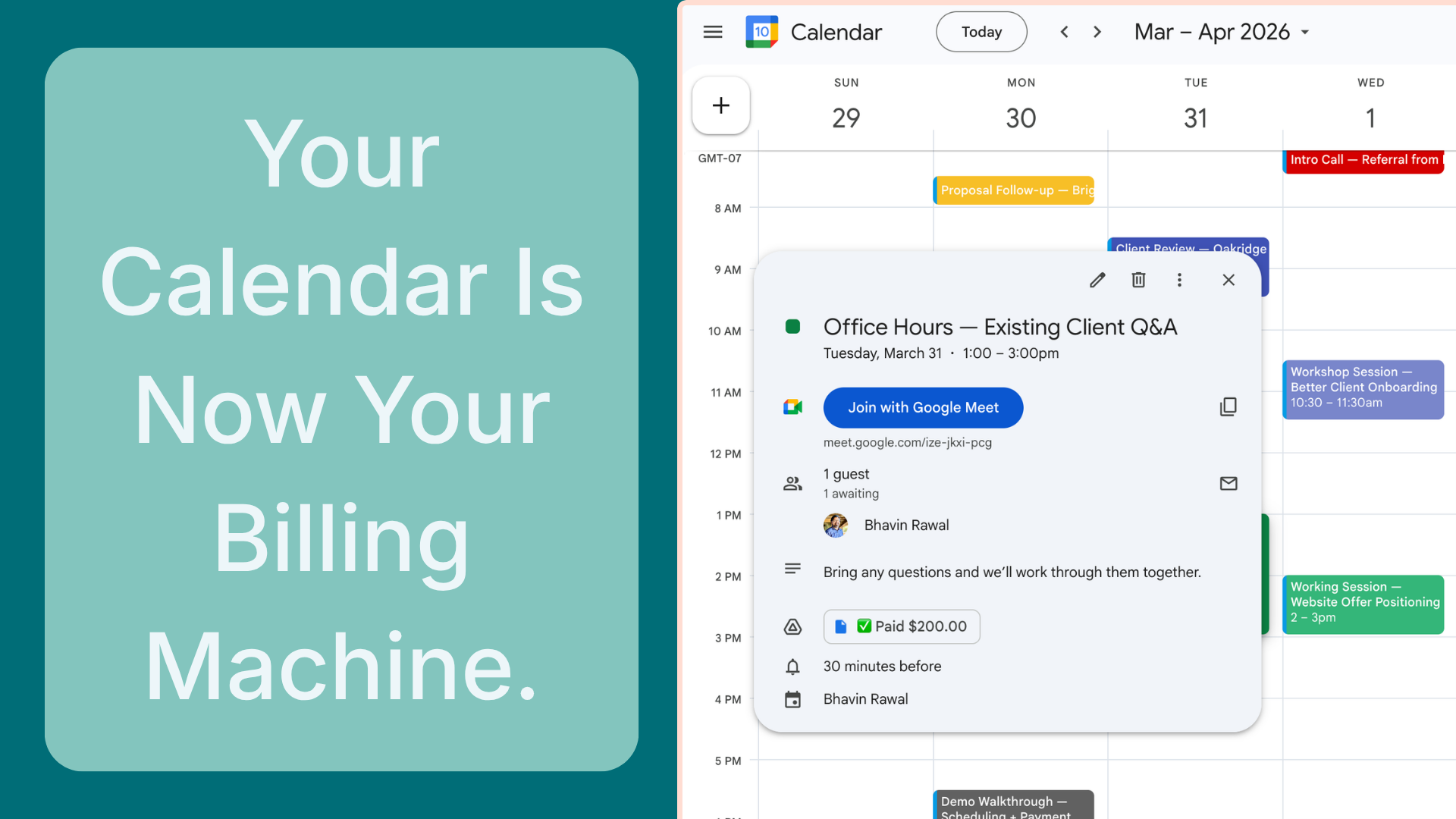
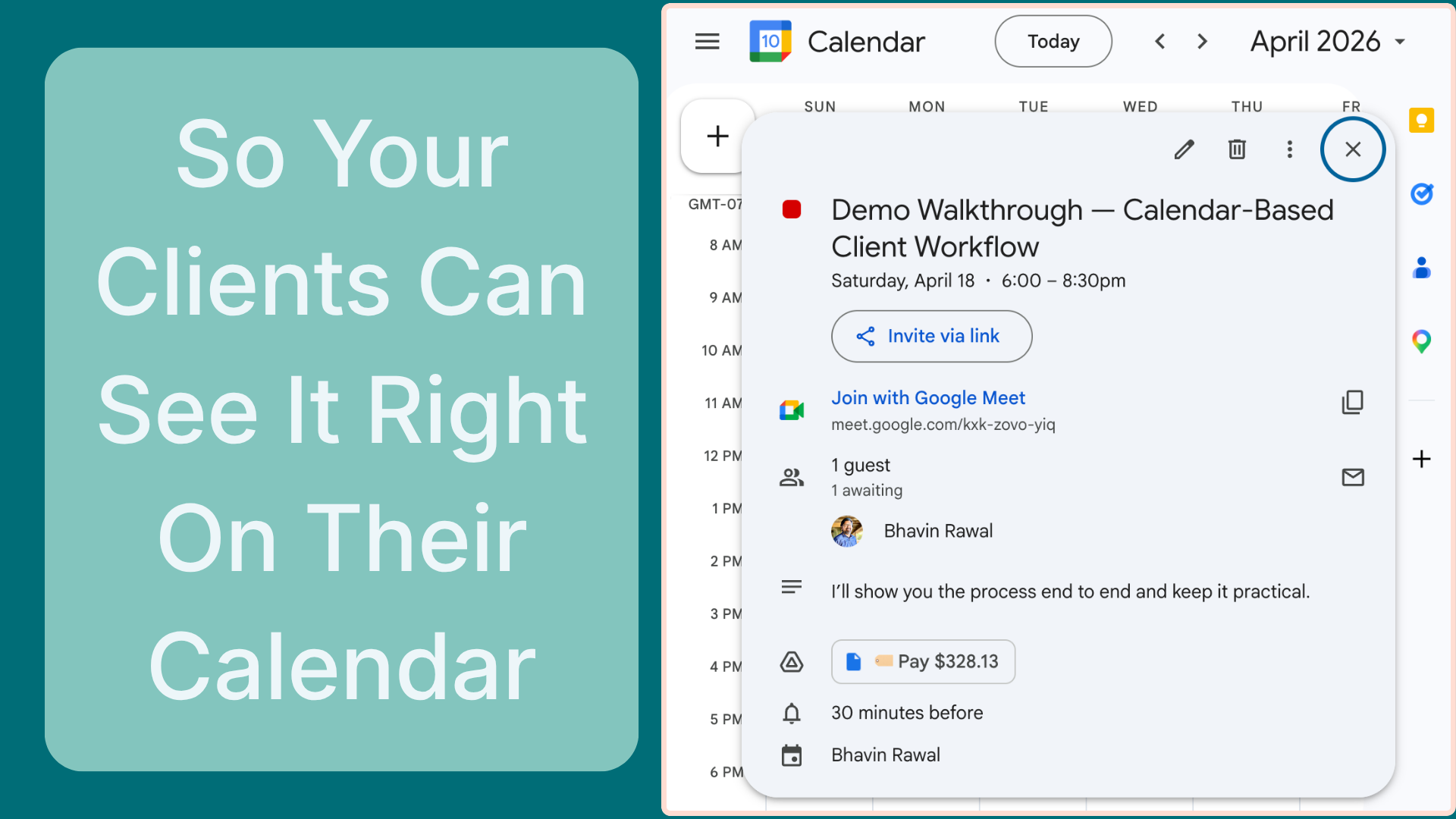
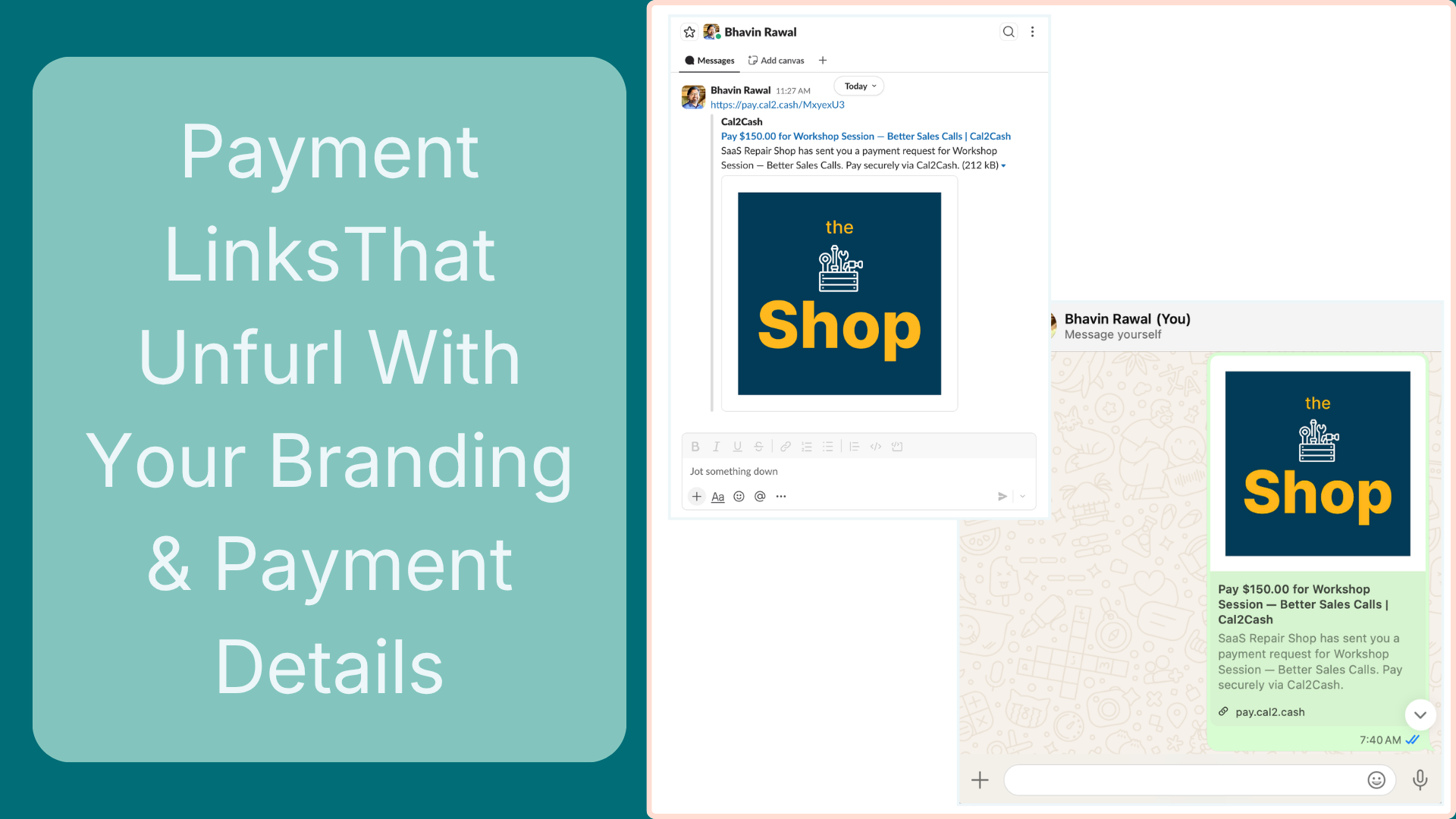
Cal2Cash creates a short, secure payment link and attaches it inside the Google Calendar event — visible to your client.
Get paid — automatically
Your client pays with any card. You're notified instantly. Reminders and late fees run without you.
Everything you need.
Nothing you don't.
Cal2Cash is the billing layer Google Calendar never had — built specifically for professionals who bill by the session.
Works Right Inside Google Calendar
Sign in once with Google and you're connected. Payment tags show up right inside your calendar events — visible to you and your client. Always in sync, automatically.
Google CalendarSmart Payment Links
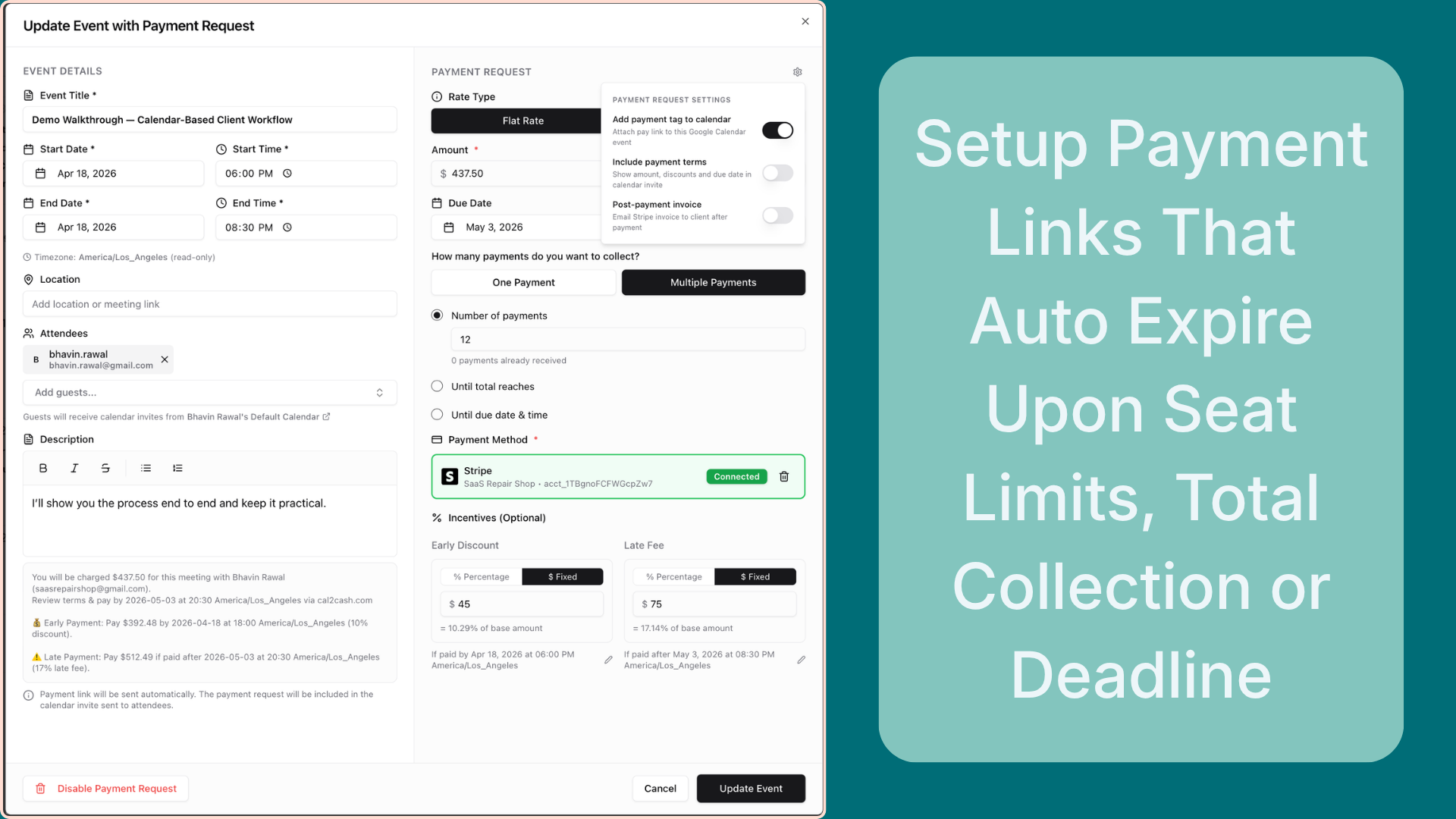
Short, shareable payment links created in seconds. Set a flat rate or an hourly rate — amounts update automatically when session duration changes. Set seat limits, expiry dates, and switch links on or off any time.
Flat & Hourly RatesEarly-Bird Discounts
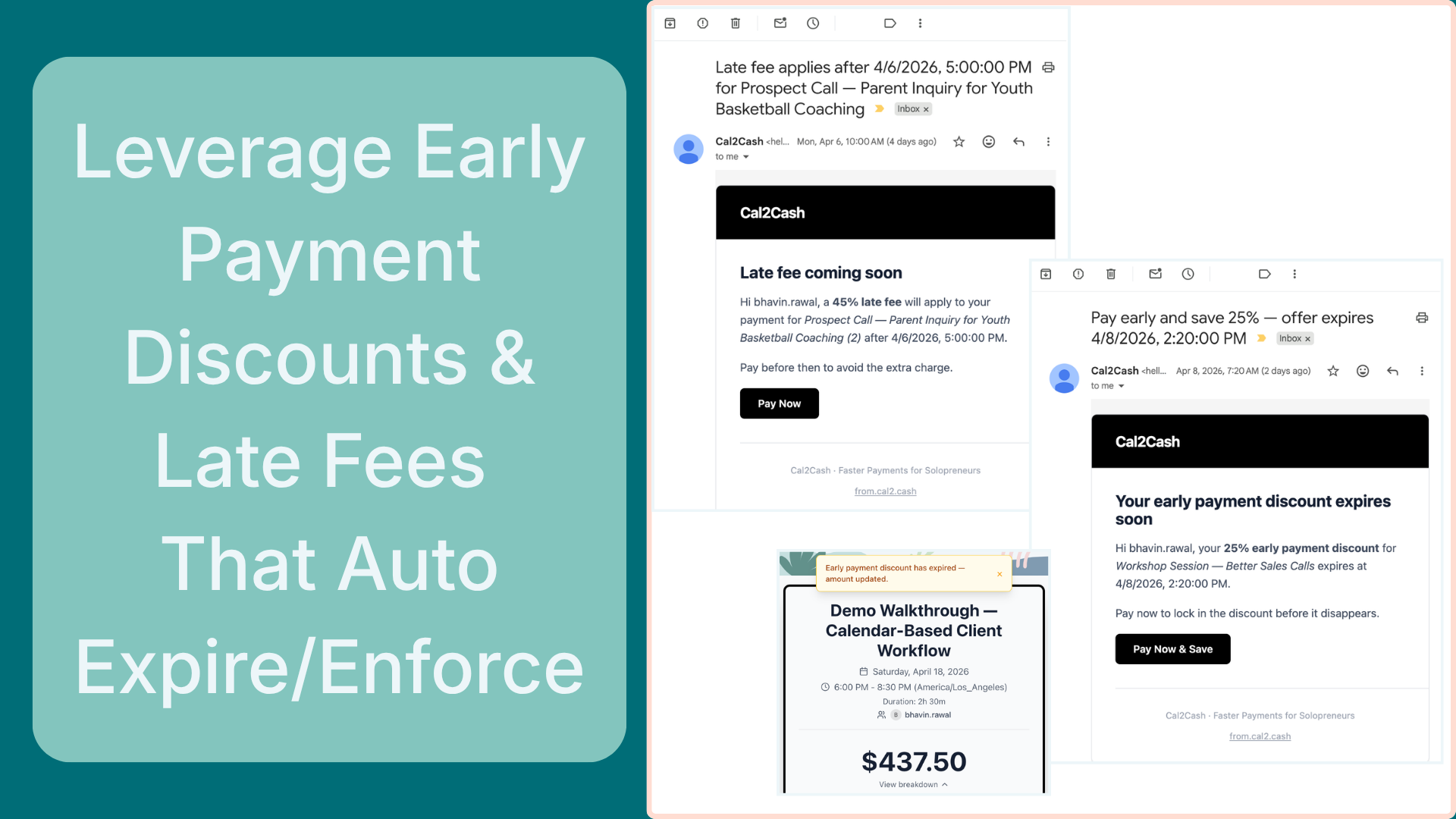
Offer a discount with a deadline and clients see the countdown right on their payment page. When the deadline passes, the price goes back to full automatically — no manual changes needed.
Auto-Expiring OffersAutomatic Late Fees
Set a late fee and a due date. If a client hasn't paid by then, the fee is added automatically, they get an email, and the payment link updates — without you lifting a finger.
Hands-Free Follow-UpAlways Know Who's Paid
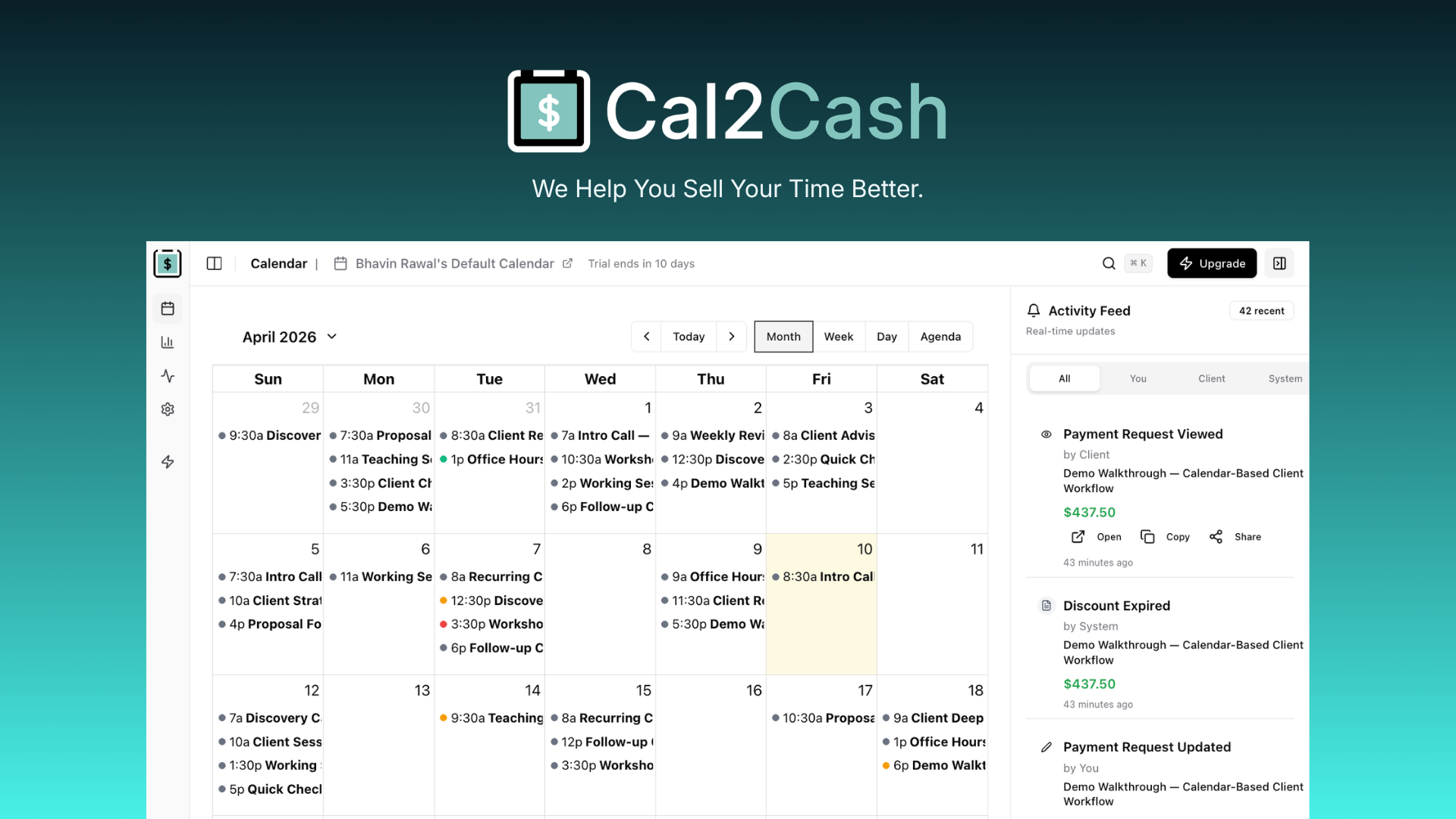
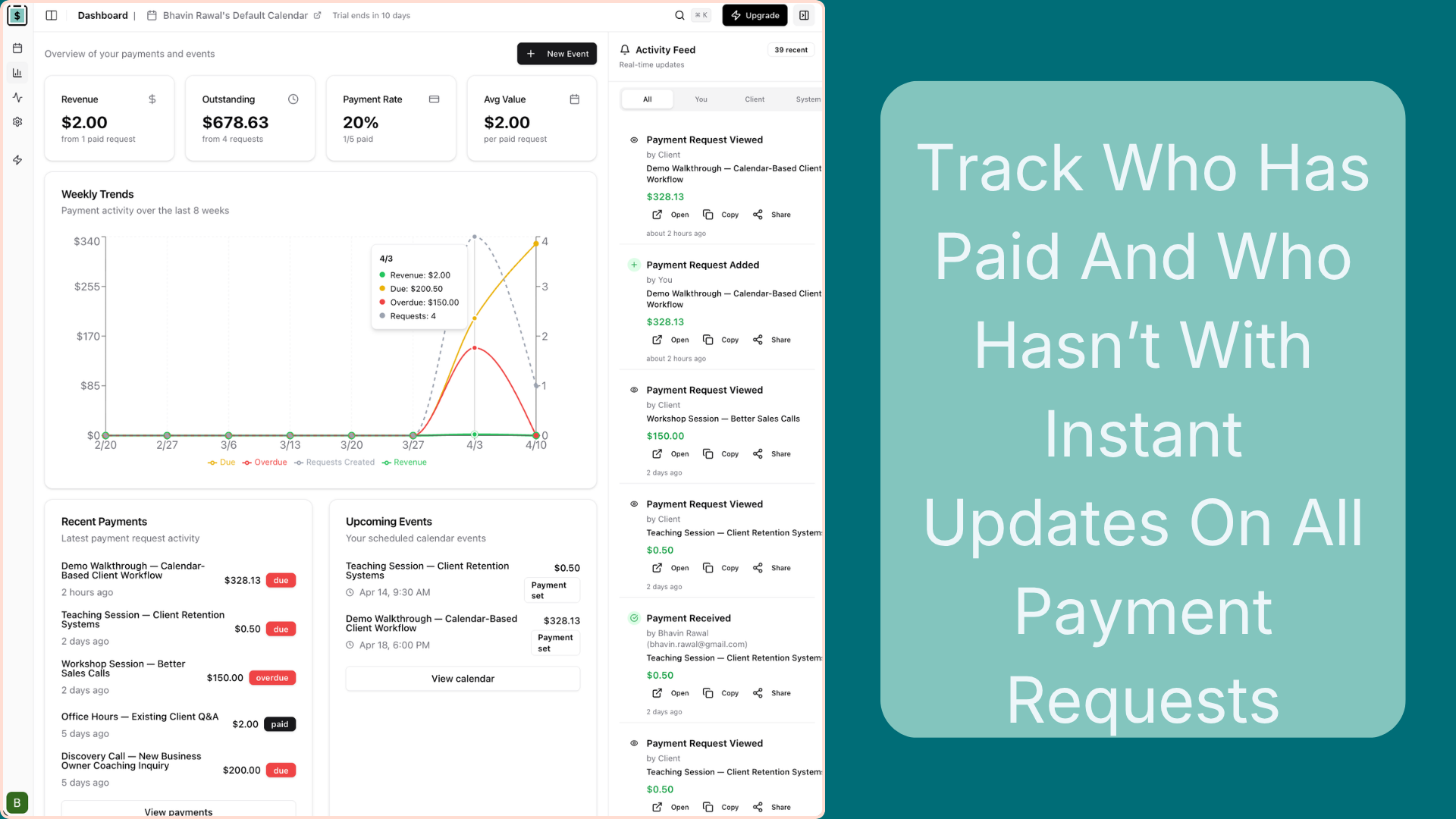
Each payment shows a clear status — Planned, Due, Paid, Overdue, or Cancelled. Updates automatically as the due date approaches and payment comes in. Visible on your calendar and dashboard.
Live Status UpdatesAutomated Email Reminders
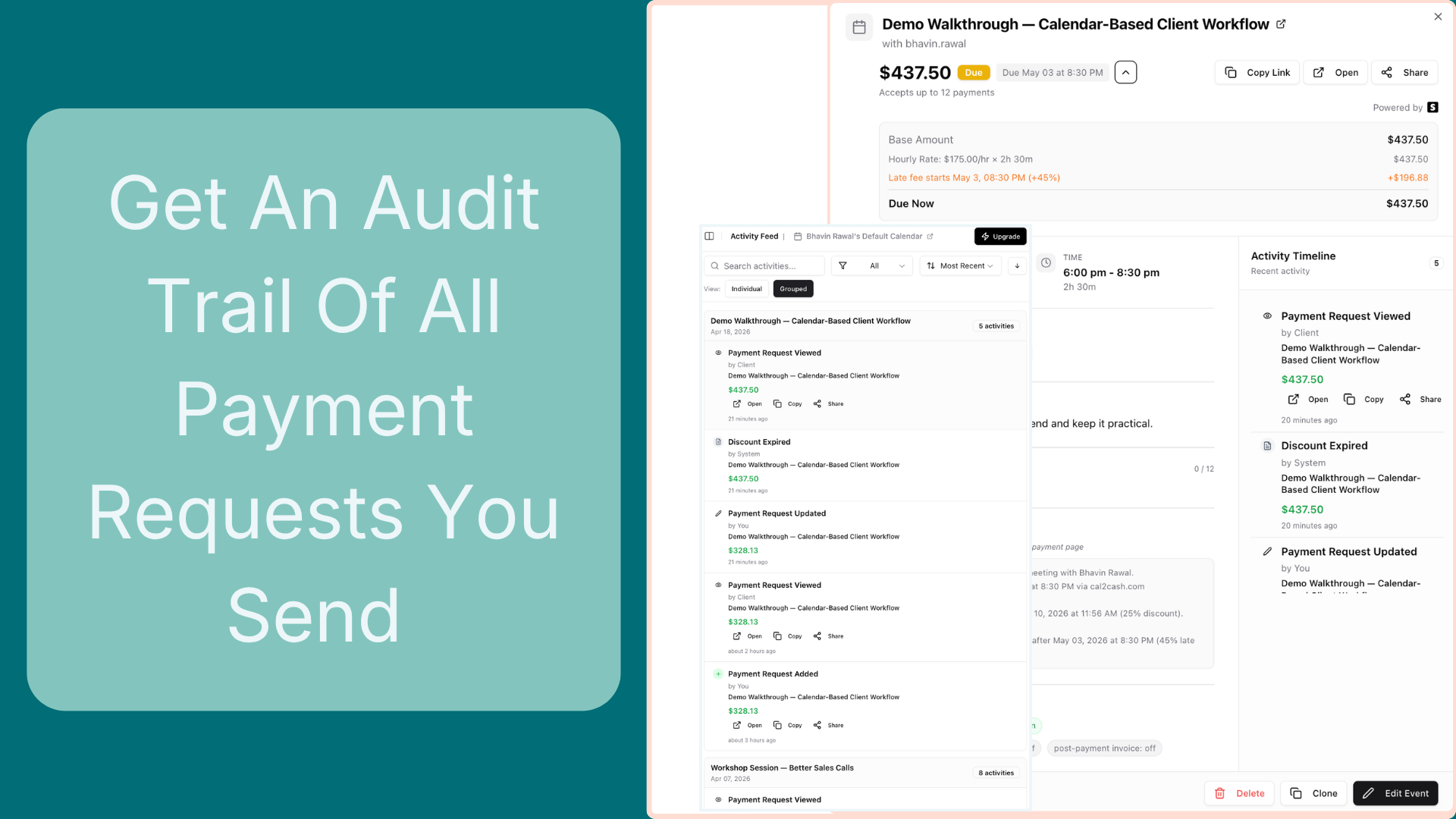
Payment requests, overdue nudges, discount countdowns, and late fee alerts — all sent automatically so you never have to chase a client by email again. Every payment keeps a full history so you always know what happened.
Set & ForgetA quick look inside Cal2Cash.
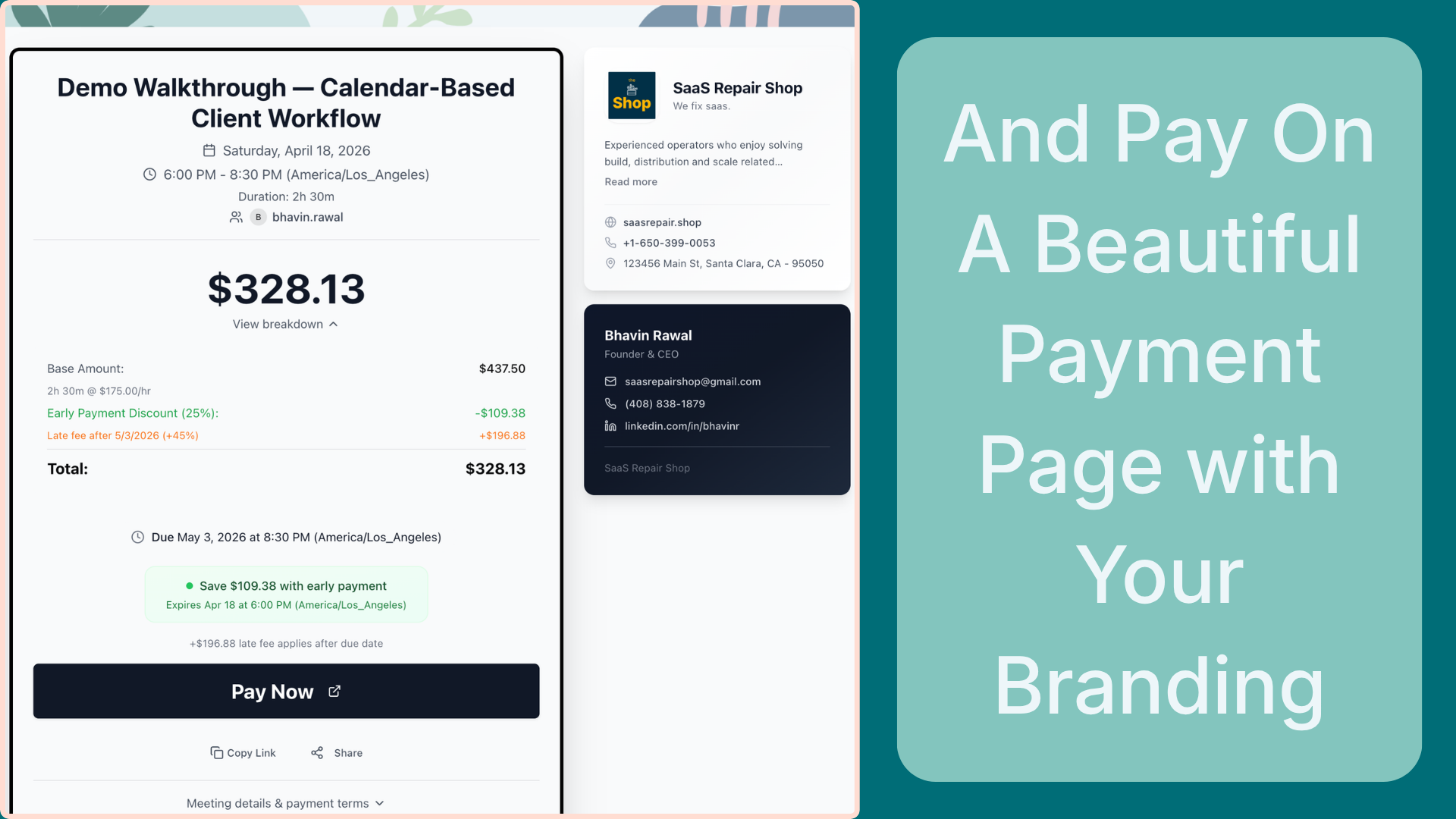
Scroll through each screen to see exactly how Cal2Cash works — from your first calendar event to the payment page your client sees.
Meet the people
who get paid with Cal2Cash
From coaches to consultants — see how professionals across every field turn calendar time into instant income.
Nina Chen
Personal Trainer
Personal TrainersClients forget to pay before sessions. Chasing payments between workouts kills her momentum.
Attaches a flat $175 payment link to every calendar invite. Clients pay before they show up.
100% pre-paid sessions. Zero awkward money conversations. Ever.
Sabrina Torres
Licensed Therapist
Therapists & CounsellorsSessions often run over. Manually adjusting invoices for 10 extra minutes is tedious — and easy to forget.
She extends the event on her phone when a client consents to overtime. The payment amount auto-recalculates from her hourly rate.
Clients always pay the exact right amount based on time used. No surprises, no follow-up calls.
Matt Rivera
Session Musician
Freelance CreativesSetting up "products & pricing" in invoicing software for a one-off gig feels absurd. He just wants to play and get paid.
Drops a flat-rate payment link directly into the gig calendar invite. Done in seconds.
Paid within minutes of sending the invite. No invoice software, no setup, no nonsense.
Alex Kim
Piano Teacher
Tutors & EducatorsAnnouncing a summer group class means juggling enrollment, early-bird pricing, and seat caps across multiple tools.
Shares one payment link capped at 12 seats with a 5% early-bird discount that auto-expires in 24 hours. Link closes when full.
Class sold out before he brewed his morning coffee. One link, zero spreadsheets.
Diego Morales
Safety Trainer
Workshop FacilitatorsAfter every training he manually creates an invoice, chases the client, and watches reminder emails disappear into spam. Always paid late.
Sets a flat-rate payment link on each training event with an automatic late fee that kicks in if payment isn't received by a specific date. Reminders run themselves.
Gets paid on time. Late-fee enforcement does the follow-up — he just trains.
Rachel Obi
Strategy Consultant
Consultants & AdvisorsTracking hours across multiple retainer clients and building invoices at month-end is a 2-hour task she dreads every time.
Every calendar meeting auto-generates a payment request at her hourly rate. Clients pay session-by-session via the link in the invite.
Revenue tracks itself. She checks her dashboard instead of a spreadsheet.
James Park
Stand-up Comic &
Live Show Creator
Selling tickets to monthly Zoom shows with no way to create urgency or automatically close sales at the right moment.
Shares a payment link with an expiry date 3 days before showtime. Extends deadline or adjusts the price on the fly based on demand.
Consistently sells out by creating real, time-limited urgency. No ticketing platform, no platform fees.
Upgrade to Cal2Cash Pro
14-day free trial, no credit card required. Here's what you pay after your trial — transparent, simple pricing.
Start free for 14 days — no credit card required.
After your trial, choose what works for you:
No credit card required · Secure via Stripe · Cancel anytime
Why Cal2Cash Pro
Turn meetings into invoices in seconds
Click any calendar event, set a price, and get a shareable payment link instantly. No forms, no friction.
Get paid faster — clients pay in 1 click
Your clients see a clean payment page with all event details. They pay with any card. You get notified the moment money moves.
Never chase a payment again
Automated reminders, late fees, and discount deadlines run without you. Spend your time on work, not admin.
Frequently asked questions
Everything you need to know before getting started.
Cal2Cash connects to your Google Calendar with a simple one-click sign-in. When you open a calendar event, you set a flat rate or hourly rate. Cal2Cash creates a payment request and drops a payment link right inside the event — visible to you and your attendees. Any time you change the event duration, the hourly amount updates automatically.
No account needed. Your client simply clicks the payment link, sees the amount and event details, and pays with any credit or debit card. The payment experience is clean and frictionless — powered by Stripe.
Yes. Rates are set per event, not per client — giving you full flexibility. You can set a flat amount for a fixed-price session, or an hourly rate that auto-calculates from the event start and end time. You can also add per-event discounts for sliding-scale arrangements.
You configure a late fee (fixed amount or percentage) and a start date. When that date arrives, Cal2Cash automatically adds the fee to the outstanding amount, sends the client an email notification, and updates the payment link — all without any action from you. No awkward follow-up conversations required.
Yes. Cal2Cash offers a free trial so you can experience the full product before committing. No credit card is required to start. At the end of the trial your account converts to a paid plan if you choose to continue — or you can cancel with zero obligation.
Cal2Cash supports all major currencies via Stripe. You set a default currency in your account settings. Your clients see amounts in the currency you've configured for their payment request.
Yes. Cal2Cash stores only the minimum data necessary — event title, time, and payment amount. No sensitive personal or financial data is stored beyond that. All payments are handled by Stripe; we never store card details. All your data is encrypted and securely stored. See our Privacy Policy for full details.
Absolutely. Cancel any time from your account settings or by emailing [email protected]. Your access continues until the end of the current billing period. No contracts, no cancellation fees.
Stop chasing invoices.
Start getting paid.
Join professionals who've made their Google Calendar the only billing tool they'll ever need.
Start Free 14-Day TrialNo credit card required · Stripe-powered · Cancel anytime